What even is a visual novel?
Okay, you’re gonna be missing a little context for this article if you actually don’t know what a visual novel is. Log off this site, purchase Slay the Princess, Library of Ruina, or BAD END THEATRE and play through it first.
I want to explore what makes a visual novel from a UX perspective. How do users interact with VNs? How do authors produce VNs? What can you actually do with a visual novel? Let’s talk about it.
Just making sure you read the banner at the top before we start, eh?
Making doubly sure…
Ren’Py: The Good, The Bad, The Ugly #
Most visual novels – at least, the ones I’ve played – overwhelmingly rely on a single technology: Ren’Py. Ren’Py is a Python framework for creating, compiling, and shipping visual novel games. It doesn’t act like a single Python library, it’s a compiler for multiple bespoke scripting languages that it packages up with a bunch of Pygame code and can ship as an executable on a number of different platforms.
Sounds confusing? It… desperately is. It’s unapproachable for non-programmers without example scaffolded projects. It does include an example game that you can start building off of) I took a stab at setting it up today after work and spun my wheels for an hour and some change. You have to learn Ren’Py’s own dialect of Python for pete’s sake. Doing anything interactive or swapping out Ren’Py’s default UI components in any capacity that isn’t a direct reskin requires you to dip your feet into extending Renpy’s underlying UI library. And that’s how you get so many games that have this exact menu:
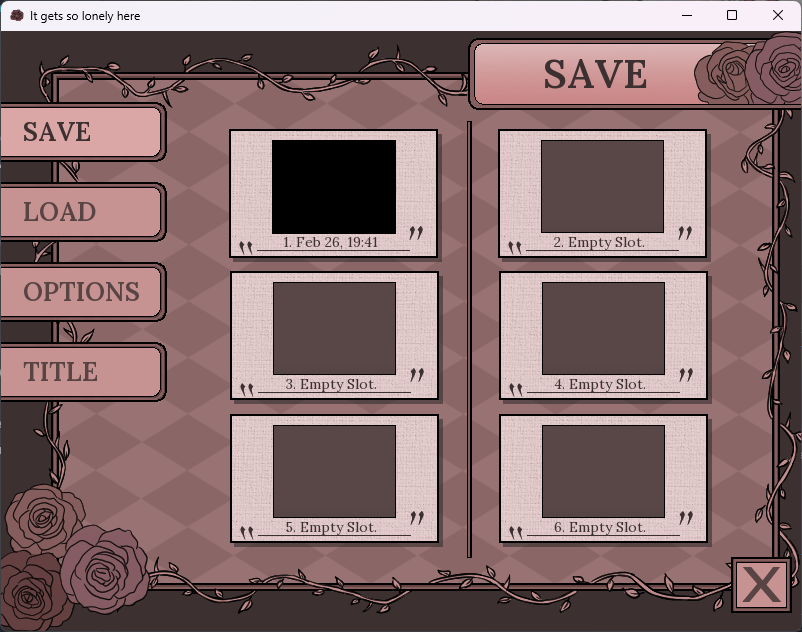
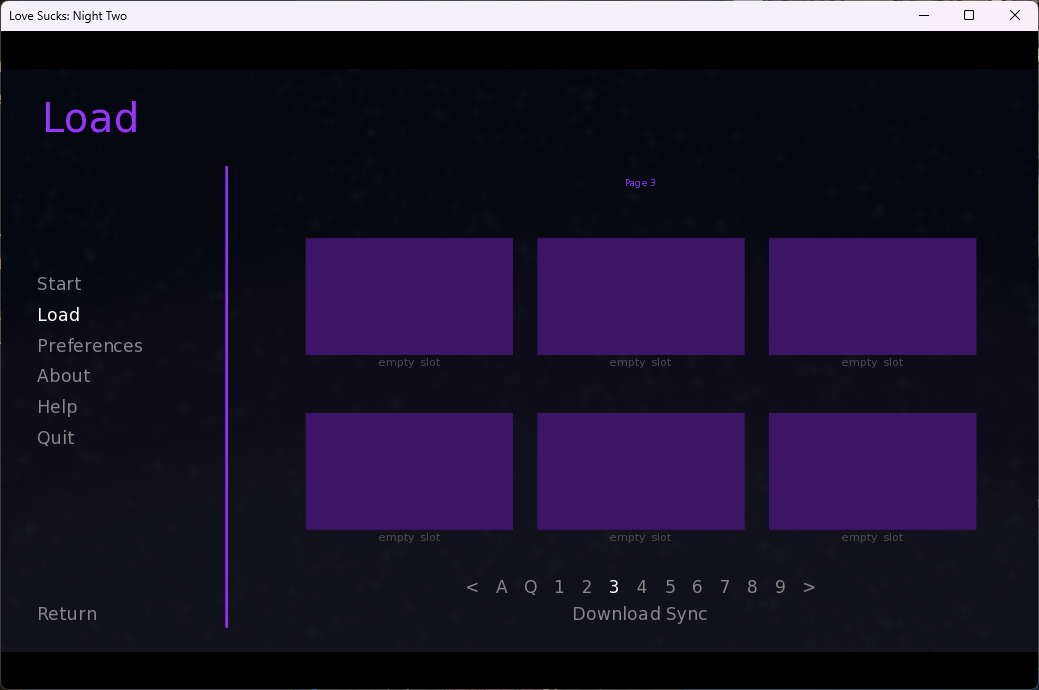
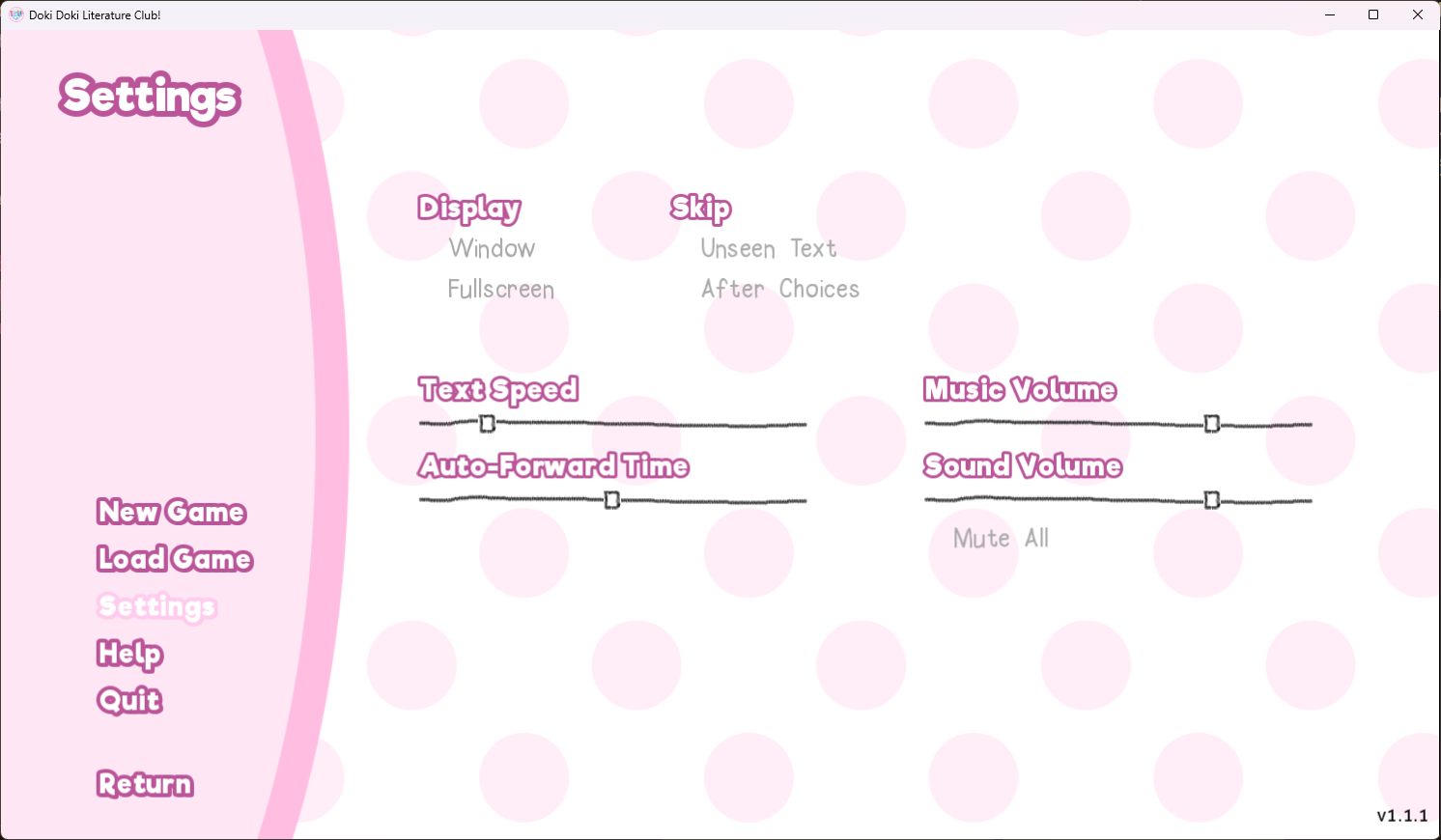
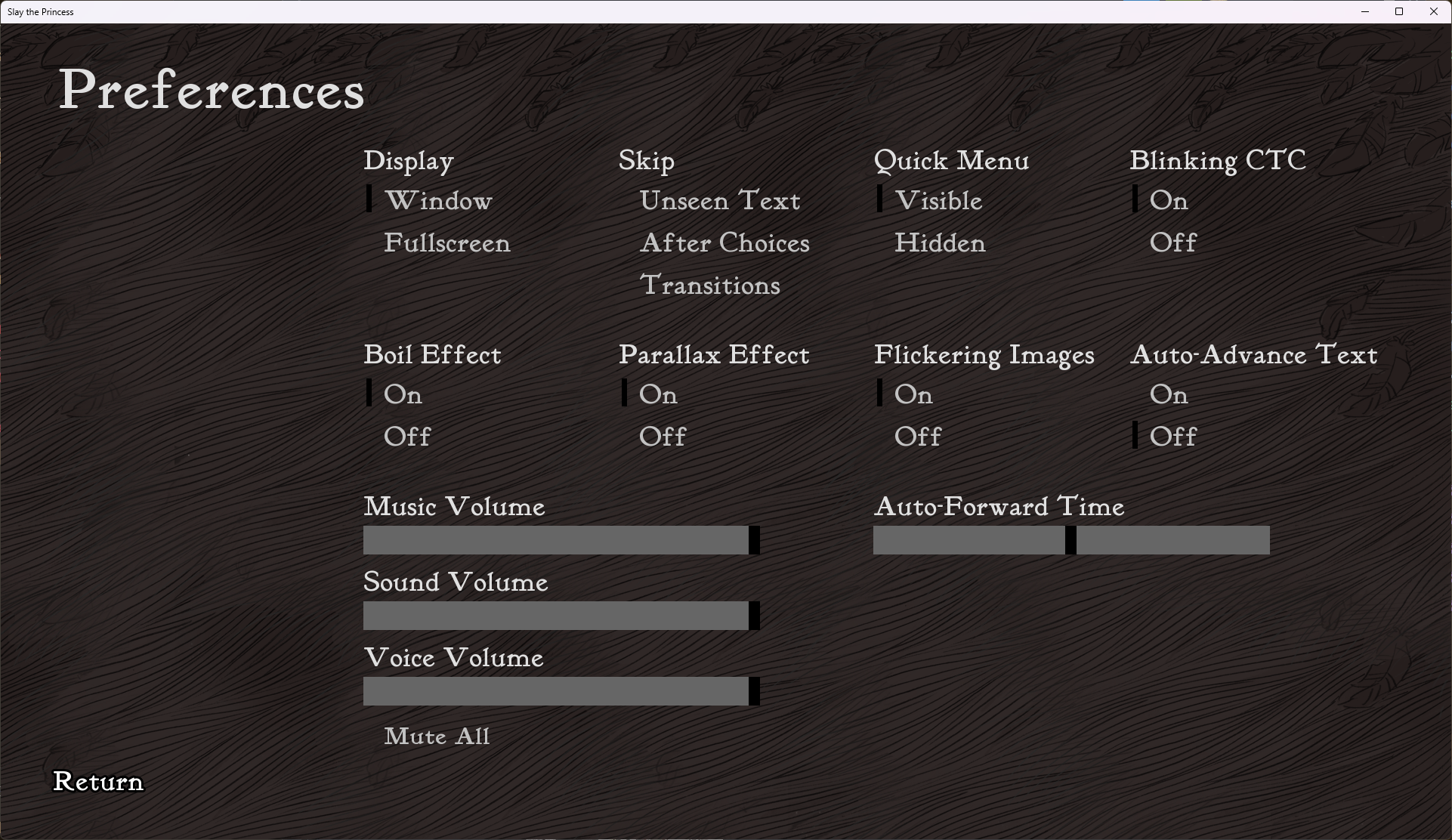 (notice the massive empty space on the left side, where Ren’Py would really like to put some navigation tabs)
Also I realize this kind of works against my point of Ren’Py being difficult to customize, but I had to include this menu design because it’s sick. check out what this team managed to do:
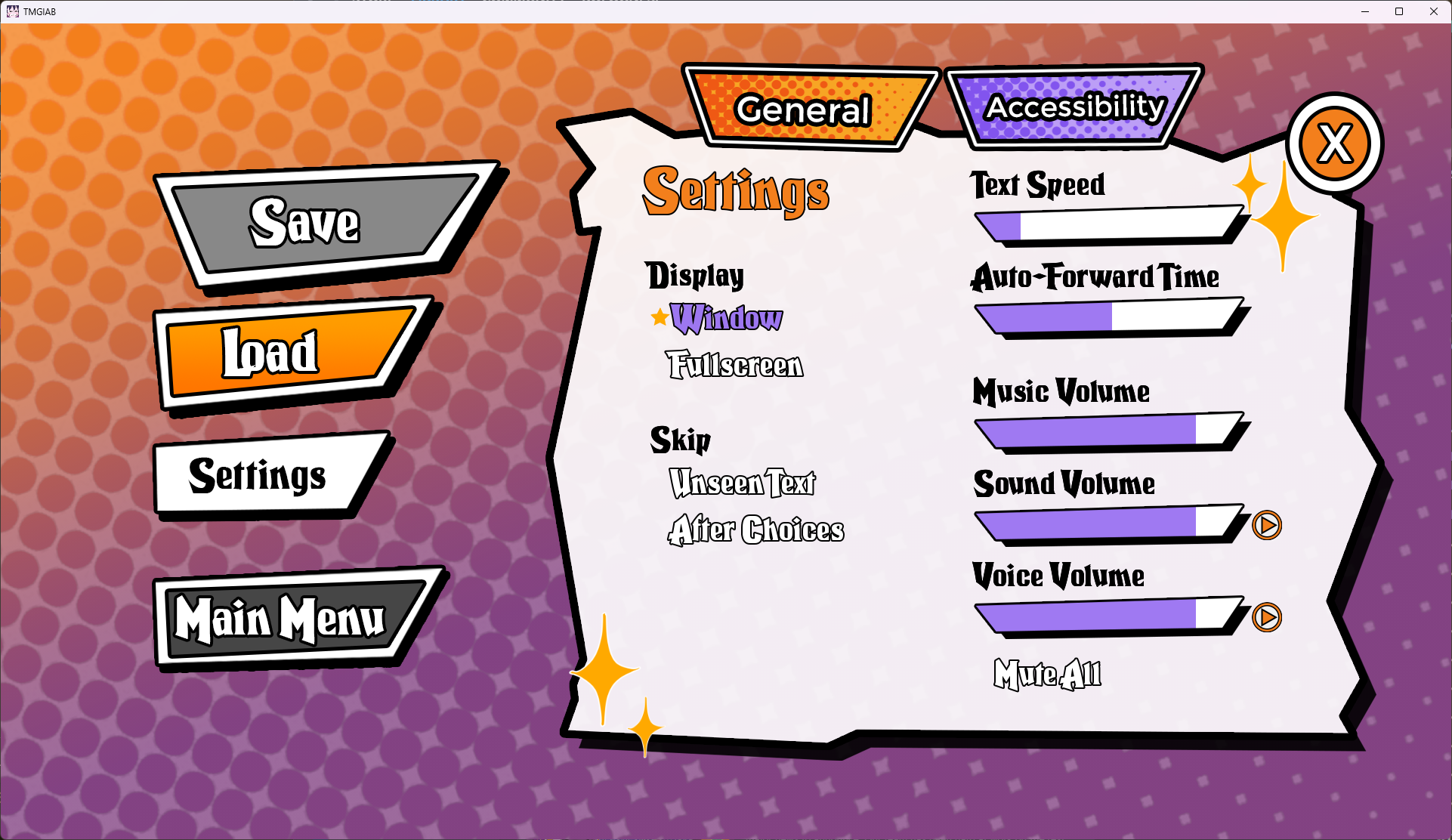
Even some of the terminology for these settings is shared and confusing. What’s “Auto-Forward Time”? I can guess that it’s the time it takes before the game’s “auto” setting decides to click through to the next dialogue box. But why’s it an unlabelled slider? What are the units? I have all of these questions, and more.
I don’t want to sound like I think Ren’Py isn’t powerful or suitable for its use-case – it’s both. And it’s got a rich community of developers built up around it for newcomers to get support.
But a system as powerful as this one can quickly veer into unwieldy territory, and in this case I fear that it has. If your main goal is to get a story and some anime characters out into the world, Ren’Py does not give you a very nice on-ramp. It kind of shoves you into the deep end without holding your hand and requires that you learn its own special rules, language, and culture.
What does a visual novel actually need to do? #
Conceptually speaking, RenPy is a VM that is
- Concurrent (the engine has to [yield] to animations, input, etc.)
- Highly Stateful (you can branch on basically any piece of data)
- Ephemeral (you have temporary state for specific scenes)
- Serializable (you can save at any point)
- Rewindable (you can backtrack through the game as far as you want)
~ and Null
From a high level, I think that this is a fantastic conceptual model for the kind of problem that we’re dealing with. Some of these traits (serializability, ephemerality, concurrency) are common requirements across all games. But some of these traits (extreme statefulness, rewindability) are unique to visual novels. This set of behaviors will be a great thing to keep in mind as we look at how a user actually interacts with a VN.
So… how do you play a visual novel?
Clicking, mostly.
Let’s look at some screenshots of the main gameplay loop of a VN:
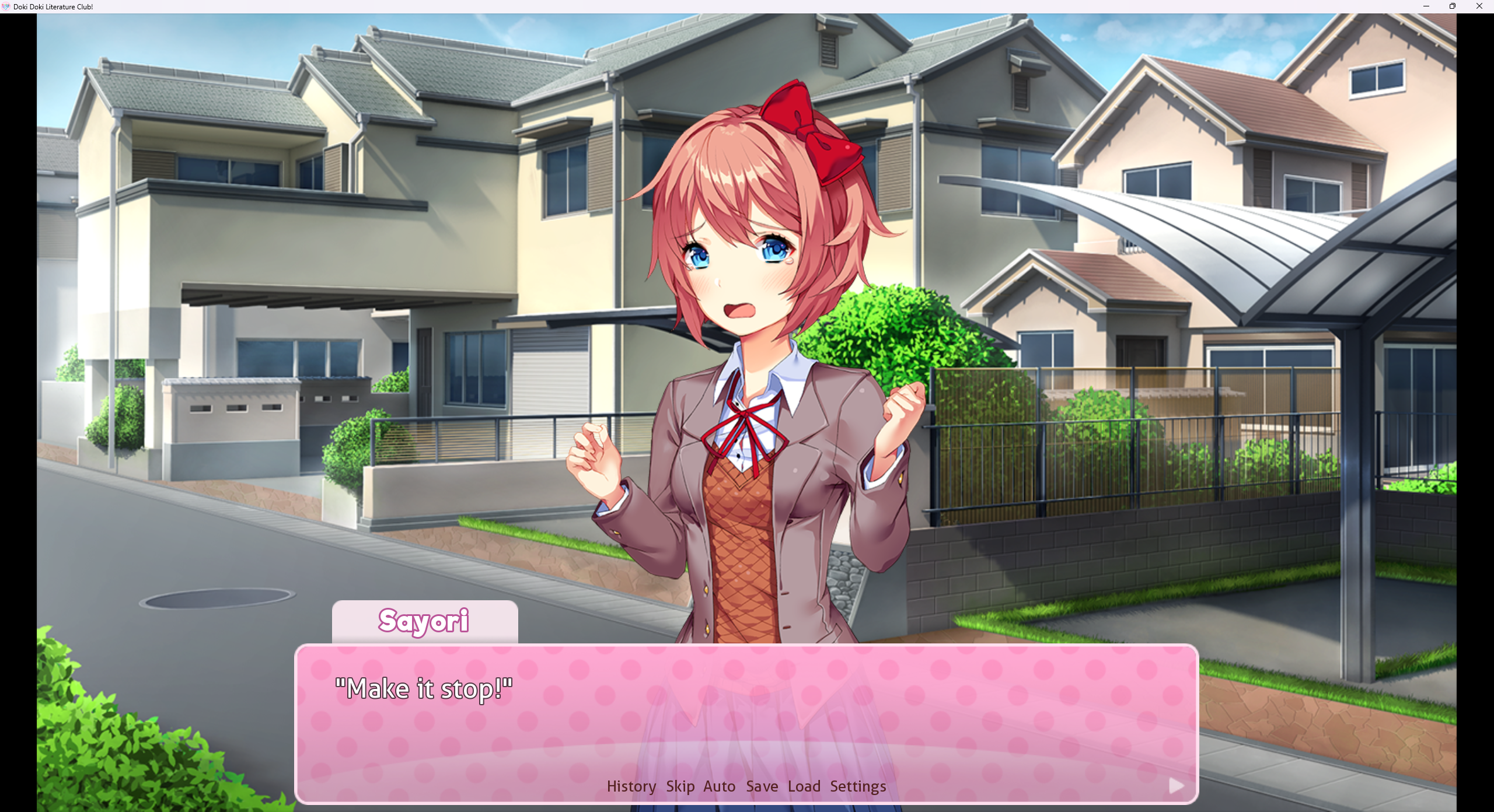
(Jeez, Sayori, I’m sorry for booting the game again… let me just get a few screenshots, okay?)
Let me highlight everything that the player can interact with here:
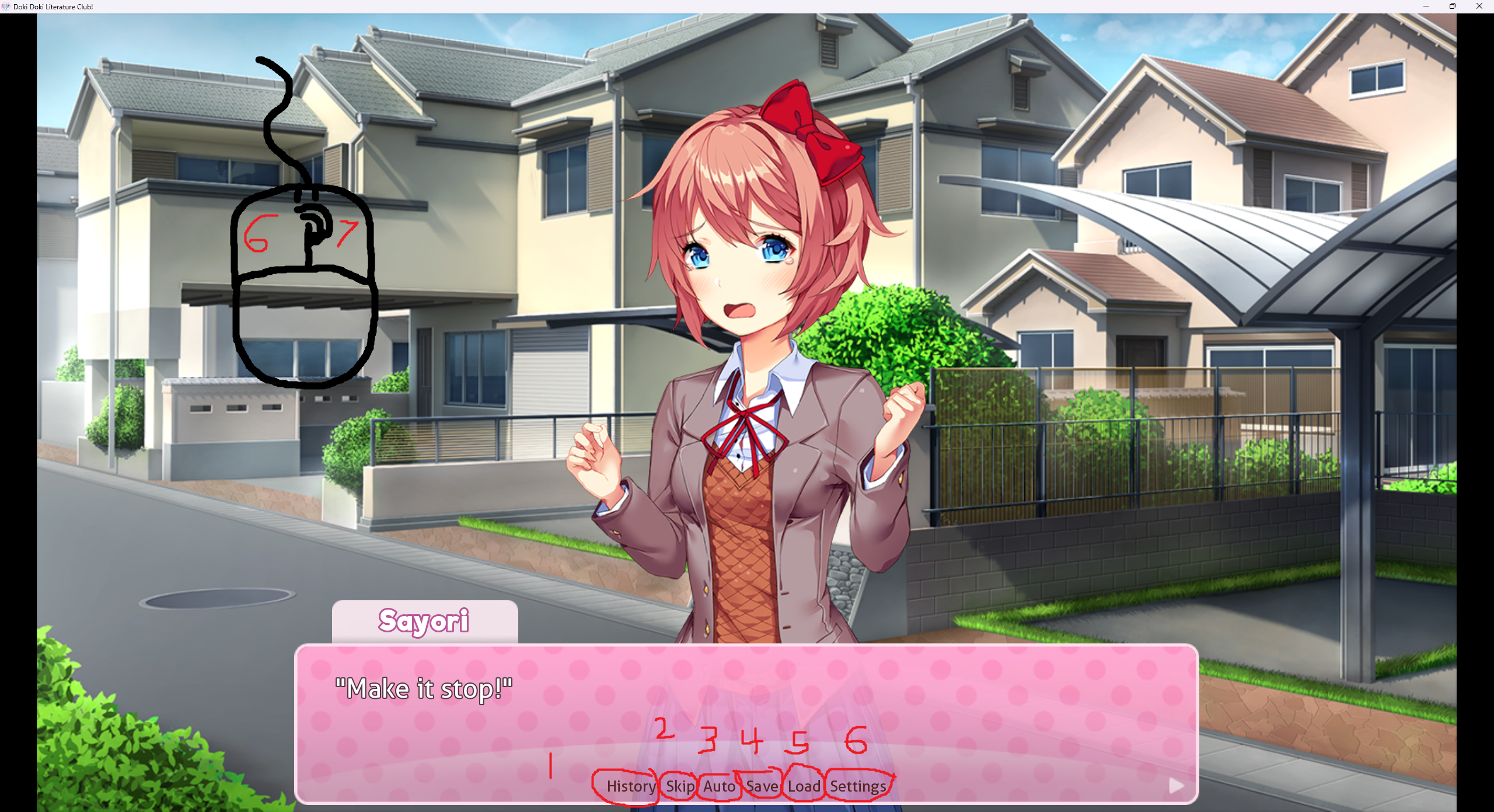
Buttons 1, 4, 5, and 6 (at the bottom, not the top left… oops! lol) all do the same thing: they open the pause menu to different active tabs. Here’s what happens when you click History, for example:
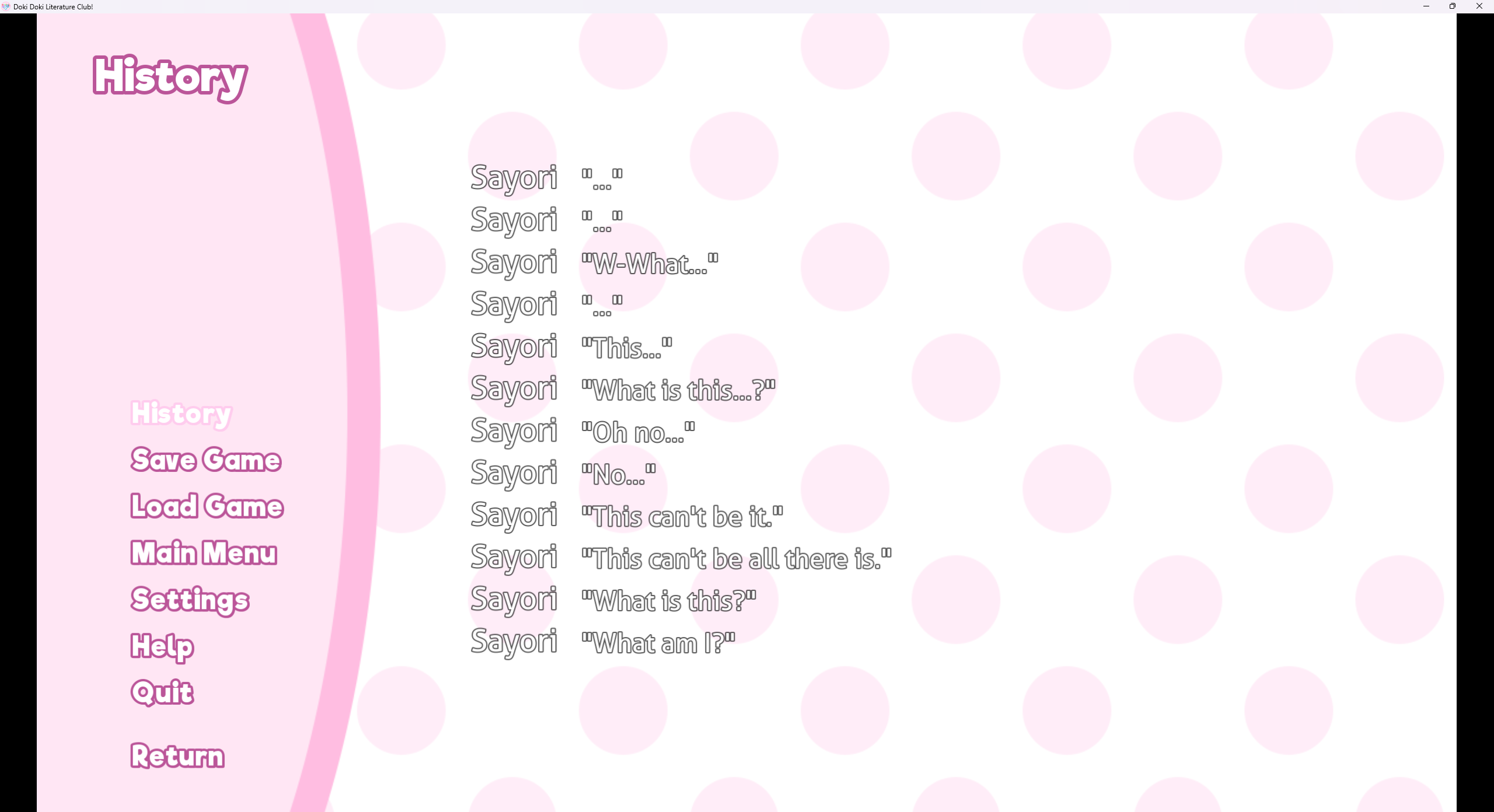
And you’ve already seen the save/load/settings tabs in the screenshots from the first section.
Buttons 2 and 3 (Skip and Auto) automatically play the VN for you. Skip skips to the end of the current chapter, and Auto plays each dialogue box at a particular speed so you can read along without clicking. I’ve always thought that these buttons live in a strange spot on the screen. They’re nestled in-between a bunch of “options” flavored buttons despite ostensibly being gameplay-related.
Now, I’ve highlighted left click and right click as separate actions (6, 7 🥴). If the user left clicks somewhere on the screen not covered by a button, it advances the dialogue or skips an animation. There’s some nuance to this: if the text is scrolling onto the screen, that counts as an animation and is skipped by left-click. If two left-click inputs come too fast, it feels like many games will debounce the second one to make sure you don’t accidentally skip too much text. I haven’t verified that but I’m pretty sure it’s true haha. Some animations (especially fade-in/fade-out and other scene transitions) are unskippable, and of course many games take over the left click behavior entirely for things like minigames.
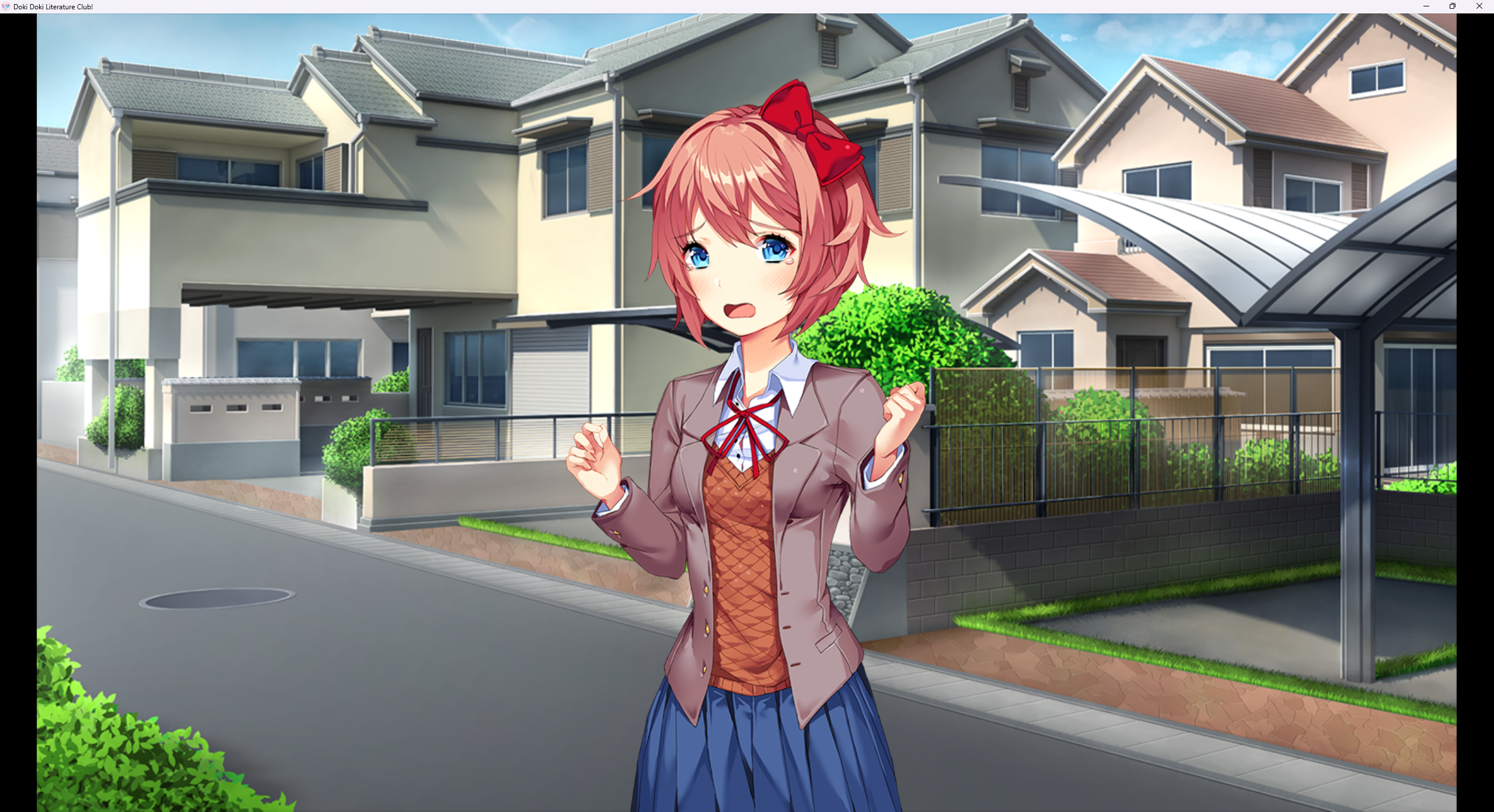
Right click is often a mixed bag. In some games, I have seen it bound to the same thing as Escape, bringing up the save/load/settings menu. In DDLC, it lets you hide the dialogue box, which just makes me kind of sad:
Rewinding the dialogue sequence is also directly exposed as a button in some games:
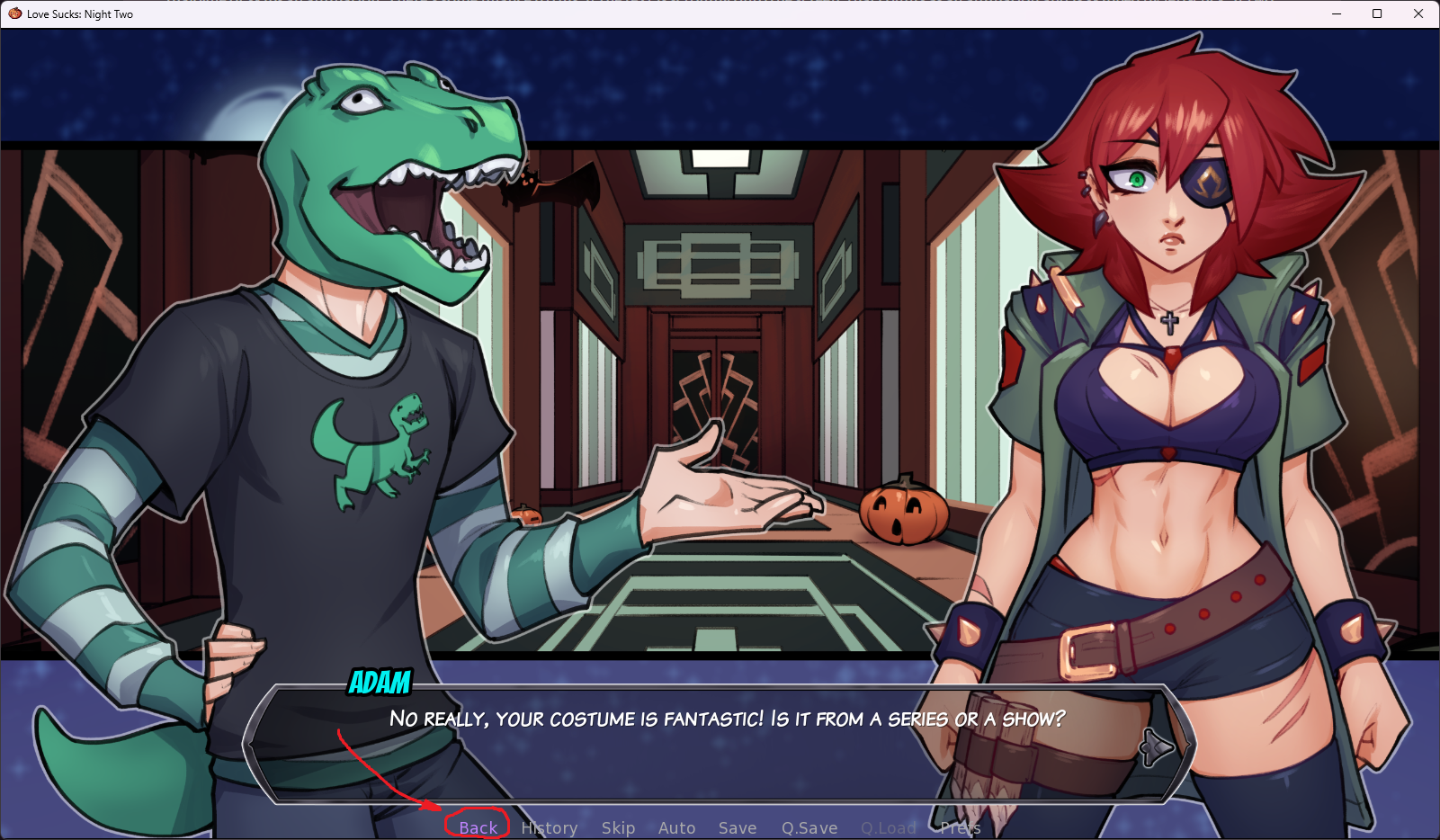
Most games that expose this Back button will bind the scroll wheel to progressing and rewinding the dialogue boxes without playing the animation. This scrolling will not skip dialogue branch points or non-textual animations that left-click would otherwise skip.
There are, of course, more advanced things that you can do with Ren’Py. DDLC has the cool poem writing minigame, for example:
This is the kind of thing that you actually need the full power of a game programming library (in this case, Pygame) to implement, so I’m going to consider stuff like this to be soft out-of-scope for my project here. Regardless of what abstraction I make, there will never be anything stopping you from digging into the internals of the VN player anyway and implementing whatever crazy stuff you want.
Okay, so what am I gonna do about it? #
I’d like to brainstorm some ideas for what a new visual novel engine may look like, considering the learnings above. There are two major priorities that I have for this project that I feel like Ren’Py falls pretty flat on:
A tooling experience good enough that non-programmers are able to start projects confidently themselves #
Let me get it out of the way up front: I intend on making a set of command line tools for VN authorship. This means that for users uncomfortable with the terminal, the tools will have a slightly steeper learning curve than they would if they were GUI based. The baggage carried by the terminal interface is unavoidable, but I believe that it presents the best opportunity to create a really nice unified interface for VN building. I think the demographic here is ripe for it, it’s going to be users who are already familiar with other art creation software and that carries a high risk of “having played in the terminal before”. Additionally, the best part about competent command line tools is that it’s so much easier to make a GUI wrapper than it is to turn a GUI tool back into a TUI tool.
With any art creation workflow I believe it is incredibly important for new users to be able to immediately experiment with the system and see live results. The feedback cycle with Ren’Py seems to be quite tight, but the real issue that I have here is that the tooling does not hold your hand at all. There’s no guidance from the software itself and it’s incredibly easy for a newer user to get lost.
Take a look at the quickstart guide consider the difficulty of starting a new Ren’Py project. So much copying files around and going through what feels like pointless modal popups. The main script of a Ren’Py game is pretty readable, but the discoverability of that file in even in the example game isn’t great.
I know it’s a stretch, but let’s compare it to starting a new Rust game-dev project with Bevy:
Okay, I’m on the quickstart guide, how do I do this?
Cool, let me make a new project:
cargo new my-gameCool, let me pull in Bevy:
cargo add bevyCool, I compiled it with
cargo runCool, the next page has me stubbing out a Bevy app – I’m up and running, and I’m already vaguely familiar with Rust!
(there are about three more pages of cool examples until the user hits a massive difficulty wall)
The engine is integrated with tooling that the user already understands – Rust and Cargo, even if they only understand it very vaguely. It’s hijacking any technique the user already had.
So, how would you start a new visual novel project with the tool suite I’m brainstorming? I want to do the same kind of strategy and make the workflow exceedingly familiar to anyone who’s used a terminal previously:
Okay, I’ve got
vninstalled, how do I do this?Cool, let me
vn init my-novel– now a folder appeared. It prompted me to type a few other things, likevn characterto see other commands.Cool, let me
vn character list– nobody appeared yet!Cool, now let’s get a new character going!
vn character newis prompting me for a bunch of information, like a name and a one-line description!Let’s see what I’ve created now –
my-novel/$ vn character list

1 character found in project `my-novel`

Rosin -- Vampire with a flair for the esoteric.
    * 0 emotions registered, see `vn emotions`
    * 0 sprites registered, see `vn sprites`
    * 0 animations registered, see `vn anim`
    * 0 lines registered, see `vn dialogue`
    * Appears in 0 scenes, see `vn scenes`
I wonder what happens when I run the game now?
my-novel/$ vn run web

You haven't designated a particular scene as the opening scene!
See `vn scenes` to find out how.

You haven't added any dialogue to your characters!
See `vn dialogue` to find out how.
This back and forth conversation with the tooling would continue. The idea is that the user won’t need to add the friction of reaching for external resources – it’s all in the tool suite. And for getting started, they also don’t have to try to understand complicated file structures or scripting languages up front. It is not a bad thing for the tool to hold your hand a little bit here.
Over time, the user will build up a folder structure that is full of images, dialogue files, animations, scene layers, embedded scripts, and et cetera. This folder structure would be bundled with a client for deployment, or alternatively run directly by a client in a web browser.
If a power user wants to dive into the code it should still be available to them. Ideally, both through an embedded scripting language and additional deeper access to the engine. I do not like that a Ren’Py power user is largely not able to transfer knowledge in and out of the internal scripting language. There is too much bespoke intricacy to the language that the waters get muddied. I’d like to be able to use a more off-the-shelf scripting language so power users can use whatever knowledge they already have, and so that there are more resources for learning the language itself. I am currently interested in using a Scheme for this but it’s still in the air. The bottom line is that I want to be:
Using as many off-the-shelf technologies as possible #
Ren’Py is able to draw strength from the Python ecosystem, which (among many other things) provides mature bindings for rendering and and multimedia libraries. I have an idea to draw on two existing technologies here to drastically accelerate the development of the clients.
First: using web technology for interaction and rendering. Things like animations, transitions, asynchronous crap, and text effects have been solved in the form of HTML and CSS rendering. The world is our oyster here. An embedded electron app is a desirable deploy target, and the quick dopamine hit and turnaround time of just being able to play your project through a file dialog in a webapp in your browser is undeniable. Whatever embedded scripting language we end up going with, we’ll also be able to embed it quite easily with Emscripten and even give it control over the page. (This is that “deeper access to the engine” from earlier.)
Second: using a Scheme as a homoiconic way to store program state. This one’s got a few layers. Dumping S-expressions is not too bad of a way to expose things like dialogue and character description to the end user. They’re easy to generate and easy to parse as well, even if you don’t necessarily have a Scheme interpreter on you. Saving and loading are a snap: we can either dump the game state from within the interpreter, or dump the entire interpreter’s state from the engine harness (ephemeral, serializable). This doesn’t instantly give us an answer for rewinding and fast forwarding game state, but at least it makes walking a dialogue tree easy.
You know I kind of lost the plot here and it’s midnight but I think I wrote down all my thoughts. I want to do more research on prior art here. There are cool tools like Twine that I know are already popular. There’s, uh, all of this on itch.io as well. INCLUDING someone taking a pretty epic stab at this idea before me! I am glad to see that this idea seems like it’s in demand, but it can get way better from here. Cheers!